PC Clock & WebClock — clocking without a wall terminal
Same rules, same audit trail as a wall clock — just no hardware to mount. PC Clock runs on a machine already on your network. WebClock adds browser clocking and lets employees see their own timecard.
- Cheaper than adding another wall terminal to a room that already has a PC
- Real-time operation — punches validate as they are entered, not overnight
- Function keys for department transfers and lunch out and in
- PC Clock is a module of TA100 and Genesis; WebClock is a Genesis module
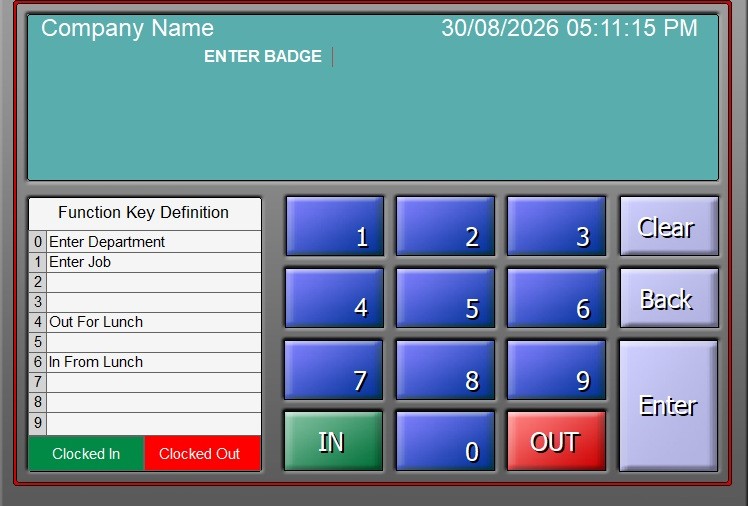
A punch terminal that is already installed
PC Clock is a software time clock running on a Windows PC on your existing network. It behaves like a wall terminal — the difference is that you did not have to buy, mount or cable one.
How it is used
- As a kiosk — a shared touchscreen or PC by the door that staff punch on as they arrive
- At the desk — office and salaried staff clock on from the machine they are already sitting at
- Function keys — department transfer, lunch out, lunch in, and the other transactions your rules need
- Validation at entry — bad data is caught as it is typed, not found weeks later in a report
- Employee messaging — a message can be waiting on screen when someone punches on
It is the obvious answer for an office attached to a factory: the floor gets a terminal, the office gets PC Clock, and both sets of punches land in the same system under the same rules.
PC Clock is available with both TA100 and Genesis, licensed as a module of either.
Browser clocking, plus what employees can see for themselves
WebClock is a Genesis module, available with both the Pro and SQL editions. It is not available with TA100 — if browser clocking and employee self-service are what you are after, Genesis is the edition that carries them. It runs on a PC or server on your network, we set it up, and your staff just need a browser.
| Works with | Genesis — both the Pro and SQL editions |
|---|---|
| Where it runs | As a web application on a Windows PC or server on your own network — we install and configure it as part of the setup |
| What staff need | A web browser on that network. Nothing is installed on their machines |
| Where punches go | Into Genesis, like a punch from any other clock — same rules, same audit trail |
| Clocking | In, out and transfers from a browser · per-employee permissions · employee time zones supported for multi-site operations |
| Time sheets | Employees submit time sheets for review; supervisors action them in the approval editor |
| Employee self-service | Own timecard · own schedule · benefit and leave balances · status board (who is in, out, at lunch or on a break) |
| Permissions | Set per employee — a site can enable clocking only, or clocking plus self-service, or self-service alone |
| Where it helps | Remote crews · multi-site operations · staff who start at a customer's premises · reducing "what are my hours?" phone calls to payroll |
WebClock reduces the load on payroll as much as it captures time: most of the questions employees ring about are answered on the screen they clock on with. Setup is our job, not your IT department's — we install it on a machine you already have and hand it over working.
Part of the full system
TA100 & Genesis
Software clocks are modules of the attendance software, not a separate system with its own records.
Compare the softwareWall terminals
Mix software clocks with SY-910 or SYnergy terminals — one set of rules, one audit trail, one export.
See the clocksReset Care
We set the permissions up with you, so employees see what you want them to see and nothing else.
Support & Reset Care